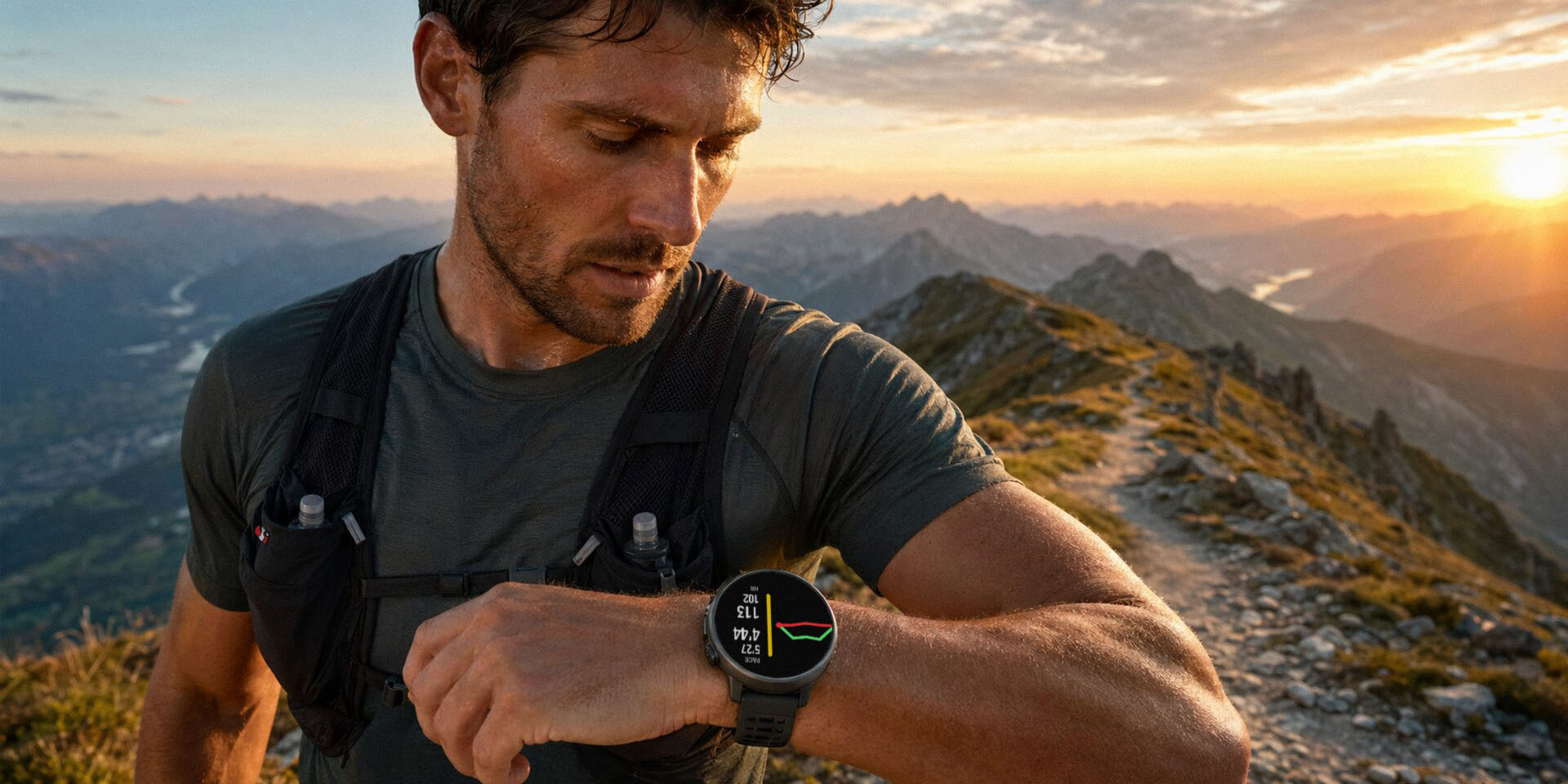

A runner pausing to check their watch on a mountain ridge at sunset.

Steady effort for SuuntoPlus™

Run Steady.
Finish Strong.

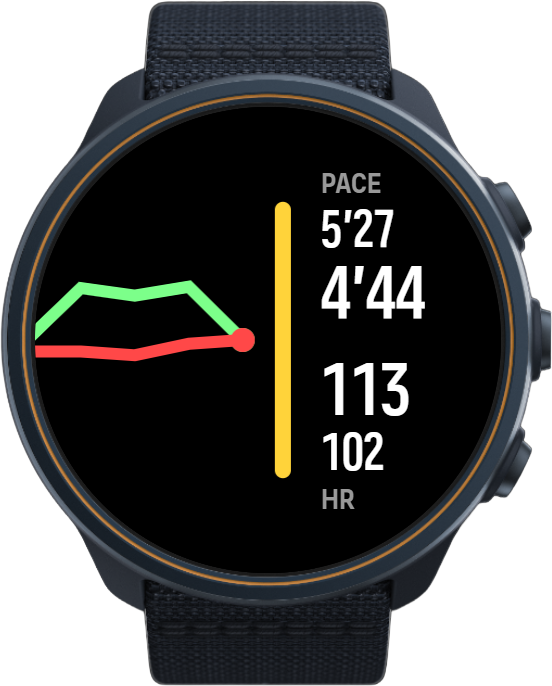
Constantin shows how your pace, NGP, speed, and heart rate move against your average effort, so you can spot drift before it costs you.

Free SuuntoPlus™ app · add it in the Suunto app (SuuntoPlus Store → Running) · Suunto 9 Peak Pro and newer.

A runner with a red, jagged mountain-ridge-shaped graph line rising behind them. Constantin watch screen showing movement-speed and heart-rate drift trends.

Why drift?

Every Effort Drifts. Most Watches Hide It.

Your current number and average number each tell only half the story. Neither one shows the direction your effort is taking. Drift reveals it: whether you're gradually speeding up, slowing down, or holding steady, and whether your heart rate is creeping up while your movement still looks fine.

Catch it early — adjust before a slow fade or a rising heart rate costs you at the finish.

The display

One Trend, Three Views

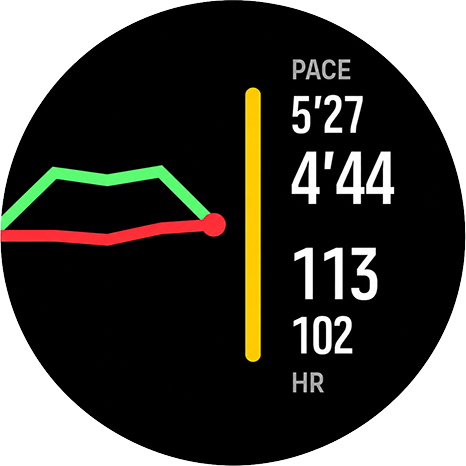
Drift shows movement speed and heart rate together. Pace and Heart Rate views zoom in when you want one signal without distraction. All three views share the same trend data, so switching views never resets the picture. Short press the upper button to move forward; long press to go back.

Tap the top button to switch views

  • Movement trend
  • HR trend
  • Current + average
  • HR zone bar
Add to Your Watch — Free

Jumps to the quick setup steps — adding it is free.

Good to know

The Details

For the curious and the practical — how Constantin works under the hood, the questions people ask, everything that's changed, and what to do if something feels off.

  • Free — no purchase, no subscription
  • Works on Suunto 9 Peak Pro and newer
  • Adds a screen — doesn't replace yours
Algorithm

Constantin reads the same workout data your watch already records and picks the right movement metric for your sport: pace for road, track, and treadmill running; NGP (grade-adjusted pace) for trail, vertical, orienteering, obstacle, and adventure activities; speed in km/h for other recognised activities. NGP uses the Minetti (2002) running-cost model — the same basis as Strava's GAP — with grade clamped to ±45%.

Each line is your drift: how far your current value sits from your workout average, tracked over time. The watch calls Constantin about once a second, but version 2.20 deliberately performs the full calculation only on every other call. The completed movement and heart-rate snapshot is rendered together on the following call, giving an effective sample and screen-update cadence of about two seconds with an intentional delay of about 1–2 seconds. Those samples are averaged into buckets, so brief spikes and GPS dropouts don't throw the lines around.

The green movement line and red heart-rate line each auto-scale independently to the movement visible in their own five points. Both are re-centred on their own current value, so when both current values are available they meet on the centreline at the right — without forcing pace and heart rate onto one shared numeric scale.

For the nerds — the exact numbers:

  • Evaluation: the system calls the app at about 1 Hz; full sports calculations and chart samples run every other call, at about 0.5 Hz.
  • Transport: one phase calculates a complete snapshot and publishes changed movement and heart-rate values; the next phase publishes the drift packet that triggers one coordinated UI update.
  • Buckets: the first four close after 6 two-second chart ticks with at least one valid channel, or about 12 s, so the line appears quickly. Later buckets close after 75 such ticks, or about 150 s (2.5 min); each point is the mean drift over its available samples.
  • Window: 4 history buckets plus 1 live point per line, so the trend reaches back about 10 minutes once it settles.
  • Missing data: pace and heart rate are accumulated independently. If one channel has not produced a valid value yet, its missing bucket is left as a gap while the other line can continue. After a channel becomes valid, short dropouts hold its latest drift.
  • Refresh: the screen gets one update opportunity about every 2 s. Text is changed only when its value differs, and the canvas is redrawn only for a real drift change, a bucket boundary, or a zone, metric, or data-validity change.
  • Normalisation: movement is clamped to ±270 s/km (±27 km/h in speed mode), heart rate to ±90 bpm.
  • Auto-scale: each line separately uses its largest on-screen deviation from its own live point, adds 40% head-room, and clamps the result to 8–100% of that channel's normalised range. Faster movement is drawn higher, within about ±16% of the dial height.

The coloured bar on the right edge is your current heart-rate zone, in Suunto's standard zone colours — a higher zone draws a longer bar.

FAQ

Which watches does it work on?

All UI2 Suunto devices, Suunto 9 Peak Pro and newer — including Race (1 and 2), Vertical (1 and 2), and Ocean.

Where do I find it?

Open the Suunto app on your phone, go to the SuuntoPlus™ Store, and look in the Running section — you'll find Constantin there. New to SuuntoPlus™? See how to get started →

Does it cost anything?

No — Constantin is a free SuuntoPlus™ app. No purchase, no subscription.

Does it replace my normal sport screens?

No. It's an extra SuuntoPlus™ screen you open during a workout — your usual data screens stay exactly as they are.

Why can't I pause the workout?

While Constantin is the active screen, the upper button is remapped to switch between its views. To pause, cycle to a different data screen first, then use the button as usual.

Why do I see -- at the start?

Until your watch has enough valid speed or heart-rate data, values show --. They fill in within the first minutes as the workout settles.

Changelog

2.20 (2026-07-27)

  • Constantin now prepares one coordinated workout snapshot every two seconds. Current and average pace, NGP or speed, heart rate, drift, status, and heart-rate zone all come from the same calculation cycle, with an intentional delay of about 1–2 seconds.
  • The full sports calculation runs only on every other system update. The following update delivers the completed drift snapshot and acts as the single refresh signal for the screen, reducing repeated calculation, data-transfer, DOM, and canvas work.
  • Pace and heart-rate values are stored first and rendered together only when the snapshot is complete. This avoids three separate screen refreshes arriving in quick succession.
  • Entering Constantin, returning from a lap overlay, or coming back from another watch overlay now restores all available numeric values in one initial render, without requiring a press of the upper button.
  • The upper button still cycles through the same three logical views: combined drift, pace/NGP/speed details, and heart-rate details. The two detail modes now reuse one lighter physical layout, reducing the amount of interface markup kept in memory.
  • The five-point trend, its separate dynamic vertical scales for pace and heart rate, and the approximately ten-minute steady-state history are unchanged. The chart fills its first four intervals quickly, then switches to longer intervals while continuing to average the samples inside each interval.
  • Heart rate can continue building its trend while pace is unavailable, for example before GPS is ready. A missing pace interval is shown as an honest gap rather than an invented value, so the pace line may temporarily contain one fewer visible point than the heart-rate line.
  • The update adds no outputs, subscriptions, polling calls, or UI timers. Trend history remains in the loaded workout screen; if the watch fully reloads that screen, the graph starts collecting its five points again.
  • Pause and resume restart the two-phase transport sequence so an unfinished snapshot from before the pause is not published afterward. The lighter cadence is intended to reduce runtime pressure when Constantin is used alongside navigation, ZoneSense, and other SuuntoPlus™ apps.

2.14 (2026-07-07)

  • The heart-rate zone bar and trend chart now react right away in workouts without speed data — indoor sessions, or while waiting for a GPS fix — where they could previously lag behind by a couple of minutes.
  • The view you selected stays selected after lap and other watch overlays, and the trend keeps averaging smoothly through them.
  • Shows -- instead of STABLE until there is enough data to judge your effort.

2.13 (2026-06-27)

  • Each trend line now scales to its own movement, so a chart looks the same whether you view it in the combined drift view or in its own dedicated view.
  • Fixed the effort direction for speed-based sports (such as hiking): moving faster than your average now correctly reads AHEAD instead of FADE.

2.12 (2026-06-25)

  • The workout screen now has three switchable views: a combined drift view, a pace-only view, and a heart-rate-only view. The upper button switches between them (short press forward, long press back). All three views share the same collected data and the same trend chart, so nothing is lost when switching.
  • The heart-rate zone bar appears as soon as a zone is active, without waiting for the trend chart to fill.
  • Both trend lines share a common scale and meet at the same point on the right, making it easier to see how pace and heart rate are drifting relative to each other.
  • The trend chart now reaches further back, giving a broader view of how your effort is changing, with a marker showing where you are right now.
  • When GPS signal drops briefly, the chart holds its history instead of clearing — the trend stays visible until data returns.
  • When you stop moving without pausing the exercise, the pace trend line holds on the last valid sample while the heart-rate trend line keeps updating.
  • Trend values are averaged over each recording interval rather than sampled at a single moment, giving a smoother and more representative picture of your effort.
  • More stable alongside route navigation and other SuuntoPlus™ apps.

1.91 (2026-06-10)

  • The trend graphs now cover about the last 6 minutes instead of 90 seconds, with the most recent minute shown in detail and older minutes grouped into wider steps — so you see both what just happened and the longer trend.
  • Evened out the heart-rate zone arc so the steps between zones 1–5 look more consistent.
  • More stable alongside other SuuntoPlus™ apps.

1.87 (2026-06-03)

  • The heart-rate zone arc now uses Suunto's standard zone colors (blue / green / yellow / orange / red).
  • The arc now follows heart-rate zones only, which fixed instability when Constantin and ZoneSense were used together.
  • Runs lighter, especially alongside other SuuntoPlus™ apps.

1.72 (2026-05-27)

  • Redesigned the workout around three clearer views: drift, pace, and heart rate.
  • Easier-to-read pace and heart-rate graphs, showing the current moment, recent trend, and average together.
  • Added intensity zone arcs on the pace and heart-rate screens (using ZoneSense when available, heart-rate zones otherwise).
  • Smoother, more stable graphs during short stops and missing pace — including while navigating a route or running other SuuntoPlus™ apps.

1.57 (2026-05-15)

  • Steadier charts and a more responsive screen: graphs keep updating after short stops or missing pace, big pace spikes stay tidy at the chart edge, and the display holds up better at workout start and when switching views.
  • Removed the "AVG" labels while keeping the average reference lines.

1.42 (2026-05-09)

  • Early stability and readability improvements: steadier graphs, screen, and layout (including when switching views), easier-to-read pace and heart-rate trends, and lighter performance on the watch during workouts.
Stability & history

Stable from version 2.08 onward — even alongside route navigation and other SuuntoPlus™ apps. Version 2.08 re-architected how Constantin aggregates and calculates its data (trend values are now accumulated over each recording interval instead of rebuilt on the fly), which made it much lighter on the watch.

For context: earlier versions could crash when several SuuntoPlus™ apps ran at once, especially with active route navigation — on Suunto Vertical 2, three at the same time was enough to bring it down. That's what 2.08 fixed.

If you still run into a crash or anything that looks off, I'd genuinely like to know — please report it to [email protected] so I can take a look.

Built to Keep You Steady

  • Three Focused Views

    Drift, Pace, and Heart Rate views share the same collected data, so you can switch focus without losing the trend.

  • Pace, NGP, or Speed Automatically

    Road runs show pace, trail and vertical runs show NGP (grade-adjusted pace), and other sports show speed in kilometres per hour.

  • Shared-Scale Drift Trend

    Green movement and red heart-rate lines meet at the current moment, making relative drift easier to read.

  • Zone and Summary Steadiness

    The heart-rate-zone bar appears as soon as a zone is active, and workout summaries add average and variation scores.

A note from me

I Used to Push Too Hard

Hi — I'm Łukasz. I made this small app mostly for myself.

I've had migraines all my life, and in sport I was always the one pushing too hard, sure that more effort meant more worth. Chasing results just brought me injuries and more migraines. It took me a while to realize sport is meant to serve me, not the other way around.

So I built the simple thing I'd always wanted: a quiet nudge that shows me when I'm speeding up for no reason. Now I read the numbers to stay steady and kind to my body — not to fix myself.

Constantin is just that — the gentle companion I wish I'd had.

— Łukasz, szmigieldesign
Platform & setup

Ready When You Are

Works with UI2 Suunto devices, including the Suunto 9 Peak Pro and newer.

1 · Get it on your watch

  1. Open the Suunto app on your phone.
  2. Go to the SuuntoPlus™ Store and open Running.
  3. Tap Constantin, then Add — it syncs to your watch.

2 · Then, on your watch

  1. Add it before you run.

    Add Constantin as a SuuntoPlus™ app on your watch ahead of your workout.

  2. Open it mid-run.

    Once your workout is running, open Constantin to check whether your effort is staying on track. Use the upper button to move through the Drift, Pace, and Heart Rate views.

  3. Give it a few minutes.

    Values may show -- until your watch has enough valid speed or heart-rate data. The trend fills in gradually as the workout settles.

New to SuuntoPlus™? See how to get started →